Why Your Email Lands in Spam (and How to Fix It)
A plain guide to email deliverability for small senders. What SPF, DKIM, and DMARC actually do, why new domains get filtered, and the fixes that move you back to the inbox.
- deliverability
- operations
The email you sent was fine. The delivery was not.
You write a normal message, hit send, and it quietly lands in spam. Nothing about the words was wrong. The problem is almost never the content. It is whether the receiving mailbox believes the message really came from you, and whether your domain has earned enough trust to be let through.
Good news: this is fixable, and most of the fix is a one-time setup. You do not need to be an email expert. You need to understand three checks and get them to pass.
The three checks every message passes through
Before a mailbox provider like Gmail or Outlook decides where to put your email, it runs three tests. Think of them as the door. Passing them does not guarantee the inbox, but failing any of them is a fast track to spam.
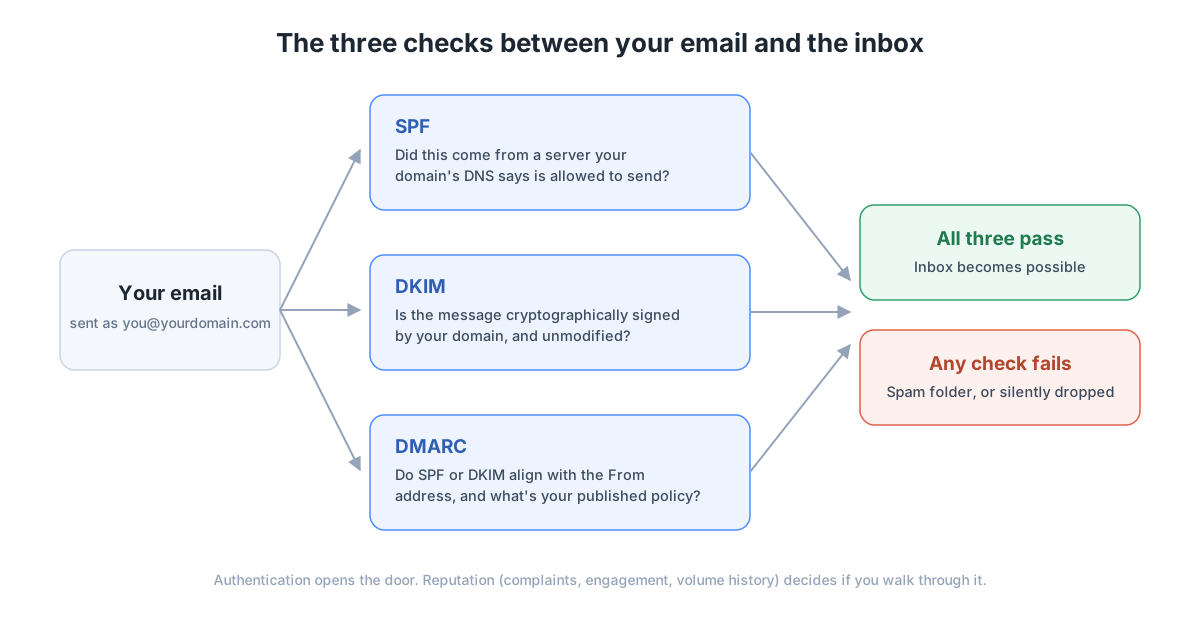
SPF asks a simple question: was this message sent from a server your domain has publicly approved? You publish that list in your DNS. If mail shows up from somewhere not on the list, SPF fails.
DKIM adds a signature. Your sending service signs each message with a key tied to your domain, and the mailbox checks that the signature is valid and the message was not tampered with in transit. It proves the mail is genuinely yours.
DMARC ties the first two together. It checks that SPF or DKIM line up with the address people actually see in the From field, and it tells receiving servers what to do when something does not match. It also lets you collect reports, which is how you find problems before your customers do.
Why new domains get treated with suspicion
Even with all three checks passing, a young domain starts with no reputation. Mailbox providers have never seen your mail before, so they are cautious. That caution fades as you send steadily and people engage: opening, replying, and not marking you as spam.
The fastest way to ruin this is a spike. A quiet domain that suddenly sends a thousand messages looks like a hijacked account. Ramp up slowly and keep your volume boring.
The fixes, in order
- Set up SPF, DKIM, and DMARC for your domain. Your email provider has a guide for the exact DNS records. This is the single biggest win.
- Start DMARC in reporting mode first (a policy of none) so you can see what is failing, then tighten to quarantine and finally reject once legitimate mail passes cleanly.
- Send from a real, human address you keep using. Do not send bulk mail from a shared provider address, and do not change senders often. Every switch resets the small reputation you built.
- Always include a plain-text version alongside the HTML. HTML-only mail is a classic spam signal for small senders.
- Give bulk mail a working one-click unsubscribe, and honor it immediately. Spam complaints hurt far more than unsubscribes.
- Turn off link tracking on important mail. Rewriting every link through a redirect domain trips filters and breaks the expectation that your links match your sending domain.
How to know it worked
Send yourself a message and open the raw headers (in Gmail, use Show original). You want to see SPF pass, DKIM pass with your own domain, and DMARC pass. Then send a real message to a free inbox-testing tool and aim for a near-perfect score. It will list anything still wrong.
Register with the free postmaster tools the big providers offer, watch your spam-complaint rate stay well under a tenth of a percent, and ask your first real recipients to reply once or drag you to their primary inbox. Engagement is reputation, and reputation is what turns a passing message into an inbox message.
The short version
Spam placement is about proof and trust, rarely about what you wrote. Set up the three checks, send like a real person rather than a machine, and give it a few weeks of steady, wanted mail. The inbox is mostly a matter of doing the boring things correctly and then not changing them.